Image
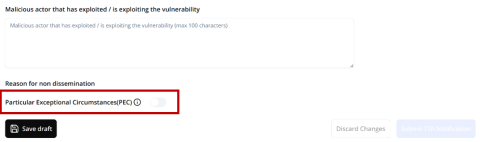

This section explains to ARs how and when to apply one of the three cases of Particularly Exceptional Circumstances (PEC), as described in the third subparagraph of Article 16(2) of the CRA.
Last updated: 12 October 2026
The information on this page is provided according to our current best knowledge and may be subject to change. Please ensure you consult the latest available guidance and related legislation, before applying these instructions.
Note: AR users can access the SRP Dashboard only after successfully logging in and while their SRP user status is “Active”, subject to applicable role and association restrictions.
Particularly Exceptional Circumstances (PEC) are applicable only when a manufacturer or open-source software steward (hereinafter the "Reporter") submits a 72-hour Notification of an Actively Exploited Vulnerability (AEV).
During the first 72-hour window, the Reporter should assess, where applicable, whether Particularly Exceptional Circumstances (PEC) apply.
In order to flag a submission under PEC, in the 72-hour report template, scroll down and toggle the Particularly Exceptional Circumstances (PEC) indicator.
PEC can be invoked only where at least one of the conditions under the third subparagraph of Article 16(2) of the CRA applies. By toggling the indicator, the PEC Delay Reason option will be displayed. An optional field is also available to provide a justification that can help the CSIRT Designated as Coordinator (CDaC) decide whether to accept the submission under PEC.
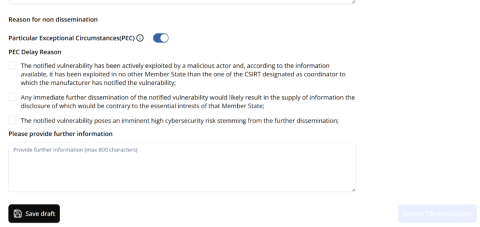
PEC is intended for exceptional situations in which the dissemination of information may need to be delayed to avoid security-related risks.
If PEC is invoked in the 72-hour Notification, the dissemination status becomes ‘72h Submitted under PEC’.
The CDaC remains responsible for deciding whether dissemination is necessary and possible, and for manually sharing the notification with other concerned CSIRTs and the full notification with ENISA.
In this scenario, the full notification is not simultaneously made available to ENISA. Only limited information in accordance with Article 16(2) is made available to ENISA.
Stay updated with ENISA! Sign up for email alerts on publications, events, vacancies, and more.